Start a Project
Project Creation Methods:
- Single Image - Drag & drop any web-accessible image
- Image Collection - Upload/organize multiple images
- IIIF Resource - Import IIIF Manifests/Collections (recommended)
- TPEN 2.8 Import - Seamlessly upgrade legacy projects
- Lacuna Pages - Add placeholders for missing folios
What Gets Created: TPEN Project (private), IIIF Manifest (shareable), Annotation Collection & Pages (Linked Open Data)
A Commentary on Knowledge
Your contributions in a TPEN3 Project are assertions - carefully defined, located, and attributed as Annotations. The digitized images and manuscripts are external resources enhanced by this work. TPEN3 puts this up front, resisting the creation of copies or disconnected commentaries. As such, the Project starts with *something* to annotate.
No matter how you begin, once a Project is created you can start to annotate the resource and collaborate with others using the basic TPEN interfaces or any customized experience.
Getting Started: The Project Creation Interface
From the TPEN 3 application at app.t-pen.org, authenticated users can create a new project by clicking the “Create Project” button on the landing page. This opens the Project Creation interface, which provides several options for importing content:
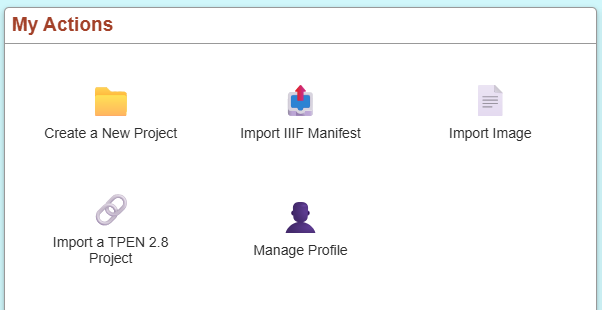
- Single Image - Upload or provide a URL to a digital image
- IIIF Manifest - Import from a IIIF Presentation 2.x or 3.x Manifest
- TPEN 2.8 Project - Import an existing project from the legacy platform
- Multiple Images - Provide URLs for a collection of images
Each method creates the necessary data structures (Project, IIIF Manifest, Annotation Collections, and Annotation Pages) that allow you to begin transcribing immediately.
Annotate a Digital Image
A transcription project can be started from a digital image of a manuscript folio. This may be any image that is available on the Internet. In the Project Creation interface, you can either drag and drop an image file or paste its URL. TPEN will create a new single-page Project with a generated IIIF Manifest wrapping your image resource.
Annotate a Manuscript or Collection of Images
Most transcription projects encompass a collection of images. In the Project Creation interface, you can provide multiple image URLs that will be organized into pages within your Project. After creation, you can use the Project Management interface to:
- Reorder pages - Drag and drop pages into the correct sequence
- Remove pages - Delete pages that aren’t needed
- Add new Layers - Create additional annotation layers for parallel texts, commentary, or specialized markup
- Add pages - Include additional images to an existing Project
While this manual organization works well, using IIIF Manifests (described below) automates much of this process and is the recommended approach for collections.
Annotate a IIIF Resource
The International Image Interoperability Framework (IIIF) is a standard for the exchange of images and other resources that TPEN 3 fully supports. Creating a Project from IIIF resources is the recommended method because it:
- Automates page organization - Pages are automatically ordered according to the Manifest structure
- Provides robust linking - Images maintain their connection to the original repository
- Enables advanced features - IIIF resources support zoom, rotation, and other image manipulations
- Ensures interoperability - Your project can be viewed in other IIIF-compatible tools
IIIF Import Process
- Find a IIIF resource - Many digital libraries provide IIIF Manifests for their collections
- Copy the Manifest URL - Look for a link labeled “IIIF Manifest” or similar
- Paste into Project Creation - TPEN accepts both drag-and-drop and URL input
- TPEN processes the Manifest - The system automatically:
- Creates a new Project record via the API at
https://api.t-pen.org/project - Extracts all Canvas resources representing pages
- Generates Annotation Collections for transcription layers
- Creates Annotation Pages for each Canvas in the Manifest
- Creates a new Project record via the API at
Supported IIIF Formats
TPEN 3 supports:
- IIIF Presentation 3.0 Manifests - The current standard (recommended)
- IIIF Presentation 2.x Manifests - Legacy format, automatically upgraded
- IIIF Collections - Imports all Manifests within the collection (useful for multi-volume works)
Even if you only want to transcribe a few pages from a longer resource, importing the full IIIF Manifest is recommended - you can hide or skip pages you don’t need.
Annotate a Lacuna (planned feature)
A Lacuna refers to a missing or undigitized portion of a folio, an entire folio, or perhaps even entire sections of a manuscript. It can also be a purposefully placed blank page. Within TPEN, you can represent lacunae as IIIF Canvas resources with placeholder images. This is useful when:
- Continuous text is available but the physical manuscript is damaged or missing
- You need to maintain page sequence for scholarly reference
- A blank page needs to be represented in the page order
Note: Lacuna pages should supplement, not replace, properly digitized manuscript pages in scholarly transcription work.
Import a Project from TPEN 2.8
Existing users of the legacy TPEN platform at t-pen.org can import their projects into TPEN 3. This migration process:
- Link your TPEN 2.8 account - Connect your legacy account through the user settings
- Select a project to import - Choose from your existing TPEN 2.8 projects
- TPEN 3 converts the data - The system automatically:
- Migrates transcription text and line boundaries
- Converts project metadata and settings
- Recreates the project structure using IIIF Presentation 3.0 and Web Annotation standards
- Generates new Annotation Collections and Pages in RERUM (store.rerum.io)
- Review and continue work - Verify the imported content and resume transcribing
Important Notes on Migration:
- This is a one-way import, not a sync - changes in TPEN 3 won’t affect the TPEN 2.8 original
- Some TPEN 2.8 features may not have direct equivalents in TPEN 3
- Projects in TPEN 2.8 are unaware that they have been forked
- The migration uses open standards, making your data more portable and future-proof
Digital Project Resources
Regardless of your method of creation, TPEN 3 generates several interconnected digital records following open standards. Understanding these resources helps you work with TPEN data programmatically or export your work to other systems.
TPEN Project Record
Stored in the TPEN database and accessible via the API at https://api.t-pen.org/project/{id}, your Project record contains:
- Metadata: Title, description, creator, creation date, license
- Permissions: Owner, Leader, Contributor, and Viewer roles with customizable permissions
- Structure: References to layers (Annotation Collections) and the IIIF Manifest
- Configuration: Preferred interfaces, custom tools, and project-specific options
- Collaboration: List of contributors with their roles and permissions
As the project creator, you are automatically assigned the Owner and Leader roles, giving you full control over project settings and member management. The Project record is private by default - only users you’ve explicitly invited can access it.
IIIF Manifest
TPEN generates or references a IIIF Presentation 3.0 Manifest for every project. This manifest:
- Wraps image resources following the IIIF standard, even for non-IIIF sources
- Provides Canvas resources representing each page/folio in your manuscript
- Enables interoperability allowing your project to be viewed in any IIIF-compatible viewer
- May be external or generated - projects created from existing IIIF Manifests reference the original; others get a TPEN-generated manifest
For projects created from images only, TPEN generates a simple manifest following the IIIF Cookbook recipe for basic images.
Annotation Collections (Layers)
Each transcription layer is represented as a Web Annotation Collection stored in the public RERUM repository at https://store.rerum.io. These collections:
- Organize related annotations such as a base text layer, commentary layer, or specialized markup
- Follow open standards making your transcriptions portable and citable
- Support multiple layers allowing parallel texts, translations, or annotations of different types
- Are versioned maintaining a history of changes through RERUM’s version control
Most projects start with a single transcription layer, but you can add more through Project Management to accommodate complex manuscripts with multiple text columns, marginal notes, or other features.
Annotation Pages
Each page of your manuscript has one or more Annotation Pages stored in RERUM. An Annotation Page:
- Contains the individual line annotations for one Canvas (manuscript page)
- Maintains ordered lists preserving the reading order of transcribed lines
- Links to image regions each annotation targets a specific xywh region on the Canvas
- Stores the transcription text as the
bodyof each annotation with the author and timestamp
These Annotation Pages are the core of your transcription work, directly connecting your text to specific regions of the manuscript images.
Working with Your Data
All these resources are:
- Openly accessible via RERUM and the IIIF Manifest (following your permission settings)
- Standards-compliant using W3C Web Annotation and IIIF specifications
- Machine-readable enabling computational analysis and automated processing
- Portable allowing migration to other systems without vendor lock-in
You can access your project programmatically through the TPEN API, export IIIF Manifests, or directly query RERUM for your annotation data.
Note on Image Accessibility: The actual image resources only need to be accessible to your browser session. Images protected by authentication, CORS policies, or network restrictions will work for annotation but may not support all IIIF features like deep zoom or external viewer access.